|
|
Back
|
|
If you work in the electronics industry as a Manufacturing Engineer, Quality
Inspector, Test Engineer or Test Technician it is worth your while to get
familiar with Unisoft's products. You won’t find a more effective and
affordable software solution. We use Markup and Pronto Place every day at
Loral. The Unisoft Factory solution is a hidden Gem. If you have any
questions let me know. I would be happy to share my experience." |
Customer comment: "I needed
software to quickly program our Mydata and Samsung machines, create
process documentation and do 1st article inspection, etc. We are a contract
manufacturer with high mix and low volume needs. We love this software so
much and that I'm happy to be a reference site and a spotlight customer on
the Unisoft website. Your software is AWESOME! I couldn’t live without it."
Randel Stewart |
Why Companies
Choose Unisoft:
The
History
The Clients
The Price

- Literature: Click here for more literature.
Quoting - Assembly Cost Estimate Report
Import
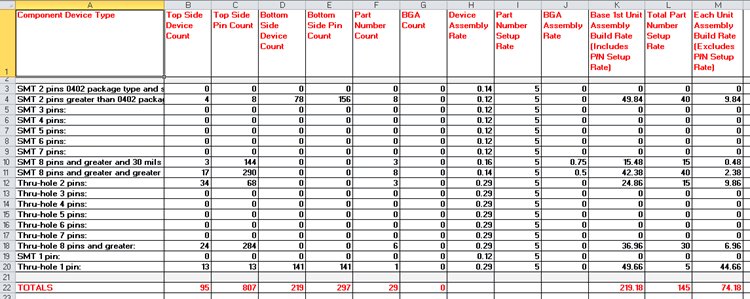
your PC Board into the Unisoft software and you instantly receive a report
containing component counts for top and bottom of the PC Board broken down by
SMT, Fine pitch, BGA’s, Thru-hole, etc. with the cost for each group.
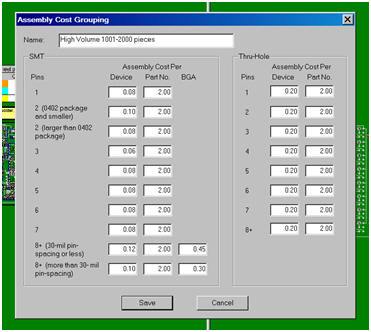
You can create as many Assembly Cost templates has you wish, for
example one each for either a Low, Medium or High volume build.
This is a great
quoting time saver for Contract and OEM manufacturers.

PC Board: SAMPLE
Date: 10-1-09
Estimated base build price total = $219.95
Device assembly total cost = $118.80
Part number total cost = $101.15
----
SMT 2 pins greater than 0402 package type: Greater than .040 inch distance
between pin 1 and 2.
Top - 4 = total device count, 8 = total pin count
Bottom - 78 = total device count, 156 = total pin count
Part #'s - 8 = total part numbers
Base price: $73.23 = (0.08 * device count) + (8.33 * part #'s)
SMT 8 pins and greater and 30 mils or less pin spacing (fine pitch):
Top - 3 = total device count, 144 = total pin count
Bottom - 0 = total device count, 0 = total pin count
Part #'s - 3 = total part numbers
BGA's - 0 = included in above count.
Base price: $25.36 = (0.12 * device count) + (8.33 * part #'s) + (0.18 *
BGA count)
Component Part Cost Report
Instantly create a component part cost report. This report is used by Contract and OEM manufacturers to quickly estimate component parts costs. The report contains the total component part cost for the PC Board and breakdown by part number.
Report type: Parts count with quotation and cost estimation.
PC Board: Controller
Date: 1-12-09
Total parts cost = $43.31
----
| 381200-40-1 | 1 | $0.23 | $0.23 |
| 381212-44-1 | 4 | $0.07 | $0.28 |
| 385848-05-6 | 32 | $0.45 | $14.40 |
| 386754-99-4 | 1 | $0.16 | $0.16 |
| 389148-06-7 | 1 | $0.06 | $0.06 |
| 390579-03-3 | 1 | $0.80 | $0.80 |
| 390607-01-0 | 1 | $0.65 | $0.65 |
| 391727-10-9 | 16 | $0.04 | $0.56 |
| 391727-12-5 | 16 | $0.04 | $0.64 |
Solder Joint Count - Defect Per Million Operations (DPMO) report
Instantly create a
report of the total solder joint count for
Defect Per Million Operations (DPMO). This report is used by Contract and OEM
manufacturers for quality tracking. The report contains the total solder joints
for the PC Board broken down by SMT and Thru Hole and part number.
Report type: Solder joint count with quotation and DPMO
estimation.
PC Board: Controller
Date: 1-12-09
Total Solder Joints = 1104
Total SMT Solder Joints = 598
Total Thru Hole Solder Joints = 506
----
SMT 2 pins greater than 0402 package type: Greater than .040 inch distance
between pin 1 and 2.
Top - 4 = total device count, 8 = total pin count
Bottom - 78 = total device count, 156 = total pin count
Part #'s - 8 = total part numbers
SMT 8 pins and greater and greater than 30 mils pin spacing:
Top - 17 = total device count, 290 = total pin count
Bottom - 0 = total device count, 0 = total pin count
Part #'s - 8 = total part numbers
BGA's - 0 = included in above count.
Thru-hole 2 pins:
Top - 34 = total device count, 68 = total pin count
Bottom - 0 = total device count, 0 = total pin count
Part #'s - 3 = total part numbers
Thru-hole 8 pins and greater:
Top - 24 = total device count, 284 = total pin count
Bottom - 0 = total device count, 0 = total pin count
Part #'s - 6 = total part numbers
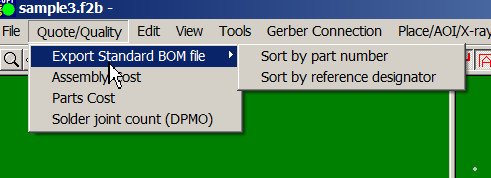
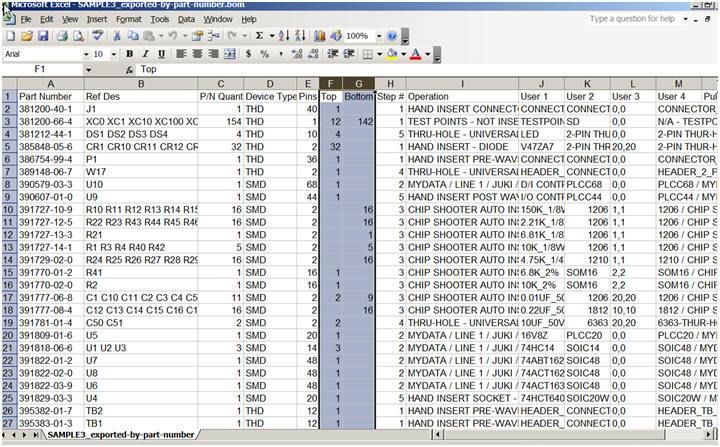
Export standardized BOM files to Part Sourcing, MRP and ERP software
All types of Bill of Material (BOM) formats can be imported into the Unisoft
software and then exported to normalized standard BOM formats that can then be
utilized by your other manufacturing software systems such as Part Sourcing, MRP,
ERP, etc.


![]()
Do you have special problems - For example: You do not have the native CAD files for your PC Board. You only have the Gerber Files and a BOM (Bill Of Materials). Our software can do it for you, it takes your gerber files and BOM and creates the exact Reference Designators, X/Y, and Part Number data the ProntoVIEW-MARKUP needs. Of course the software also imports virtually all standard native CAD file types too!
A possible next step in your evaluation is an informal online demo. We can do the demo within minutes of you contacting us! We simply invite you via email to a webpage where you view our PC live, so there is no firewall or other security issues for you to deal with. To do the demo now or schedule one call 203-913-0782 or email demopvm@unisoft-cim.com.

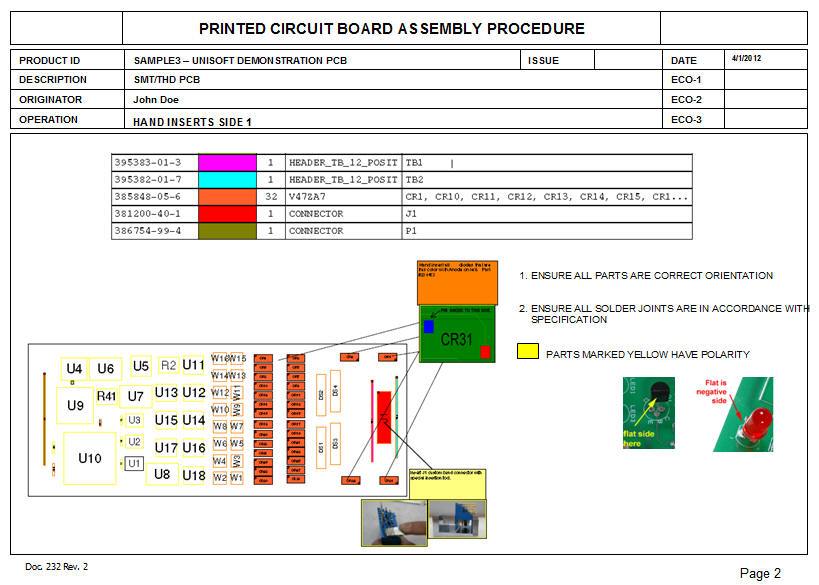
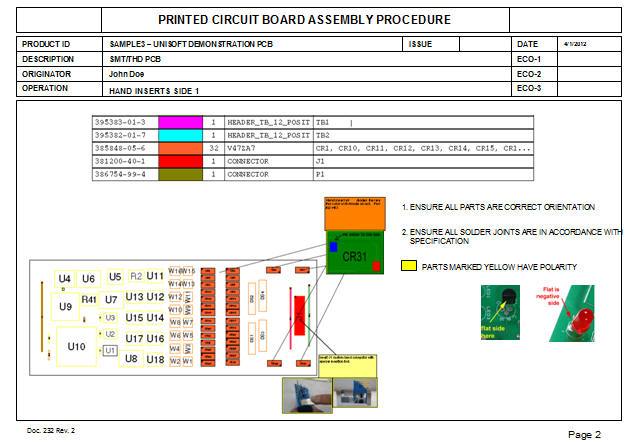
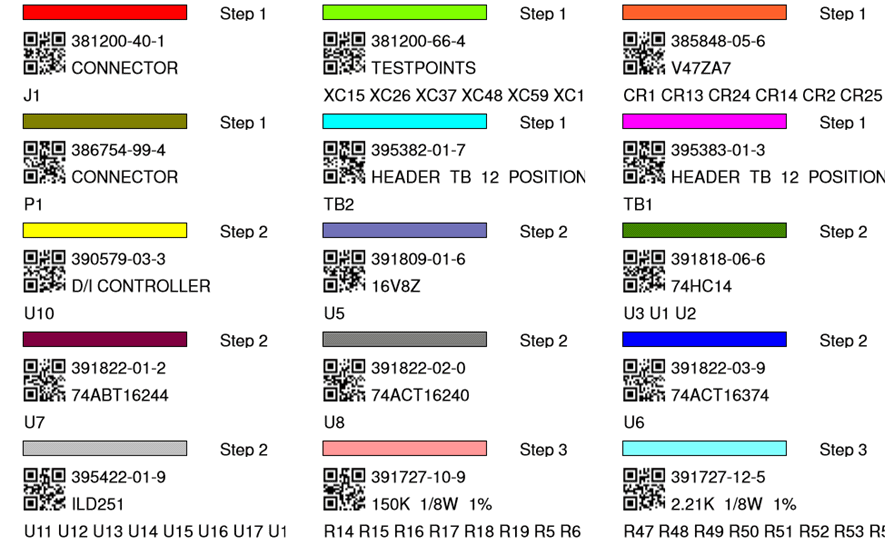
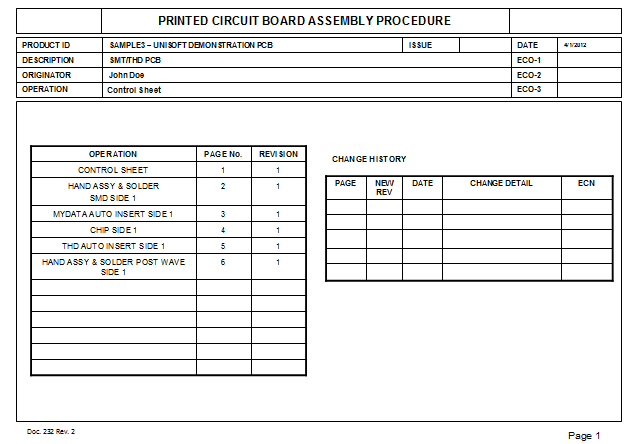
Assembly and Process Sheets
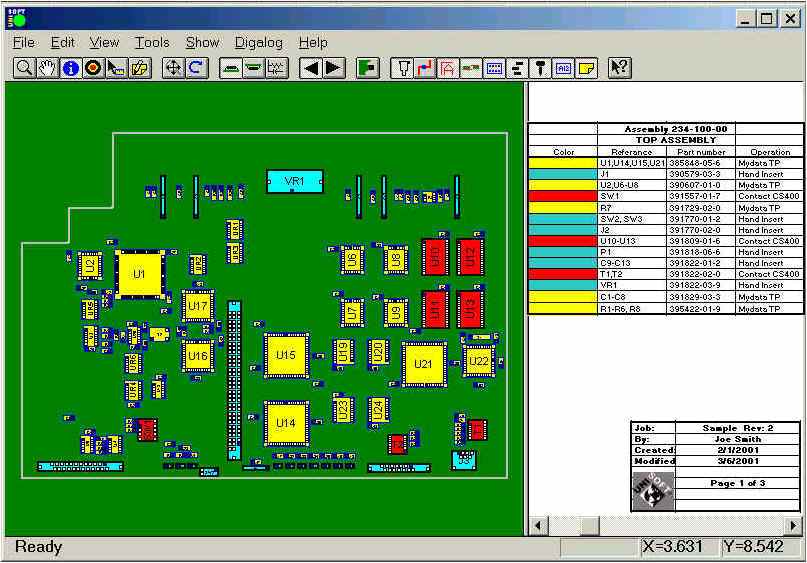
The Unisoft software allows you to quickly create matching assembly lists and assembly
drawing sheets
for each step in the assembly process.
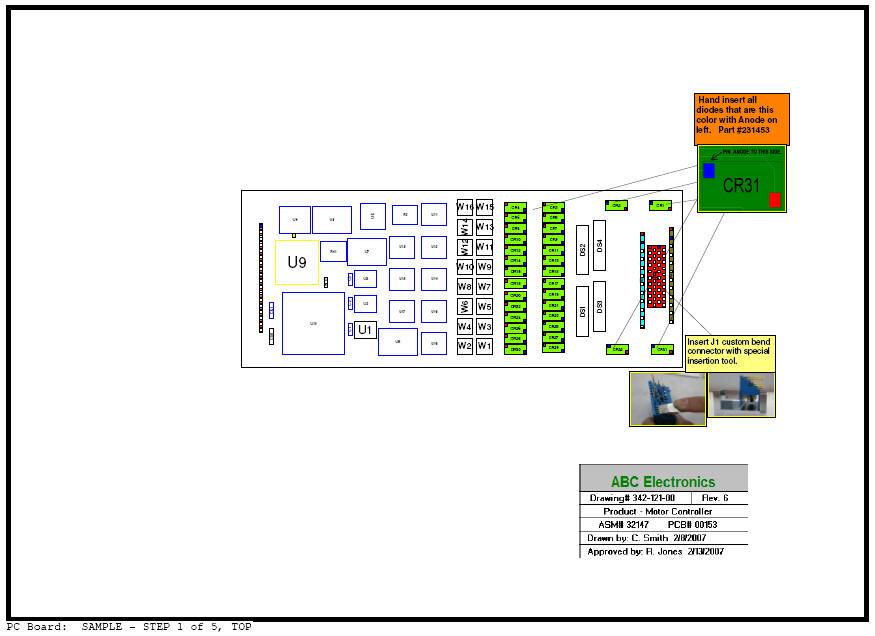
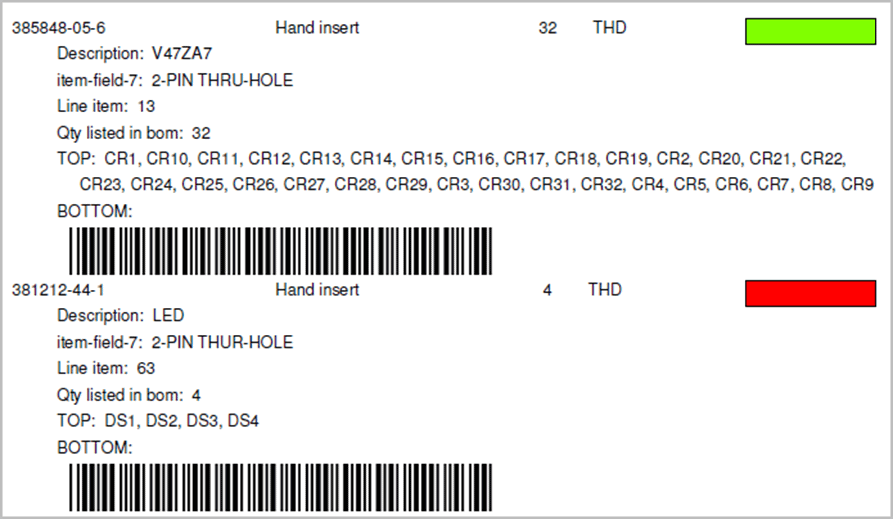
Part numbers are automatically assigned to the assembly step you wish (for
example: Step 1 for Hand Inserts, Step 2 Chip Shooter components, etc). The
part numbers are then automatically uniquely colored. If needed, overlay
annotation notes can be added to each step. Next for each step matching
assembly lists and assembly drawings are created. These drawings can
either be printed or save to a file (PDF Adobe, etc.) or displayed on the
screen.
Click here to
download a sample of process and assembly sheet documentation created by this
software.

Kitting Labels

First Article Inspection
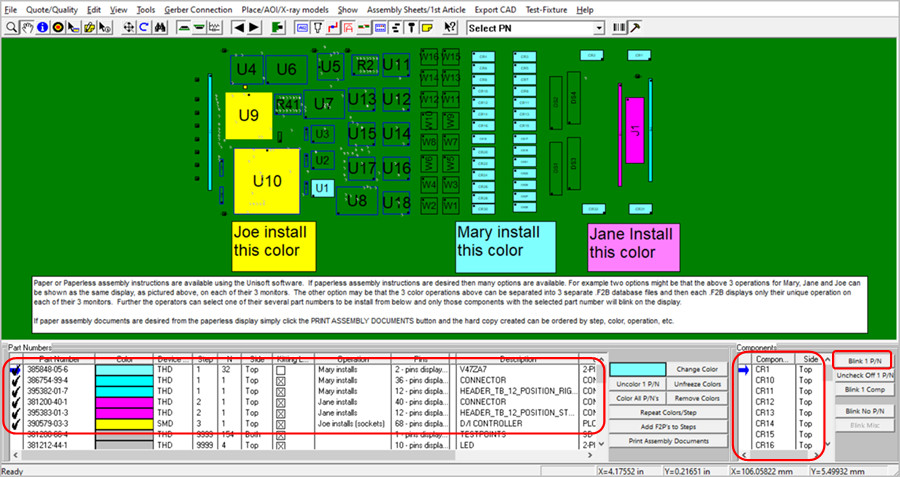
Generally First Article Inspection is done on the first PC Boards assembled. When the assembly inspection is satisfactory at that point the PC Board can be built reliably in quantity.
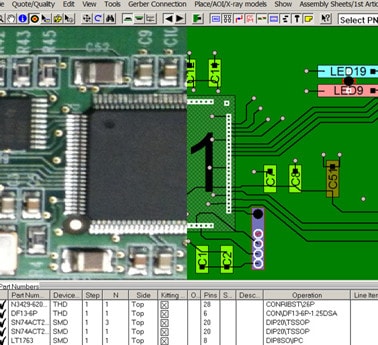
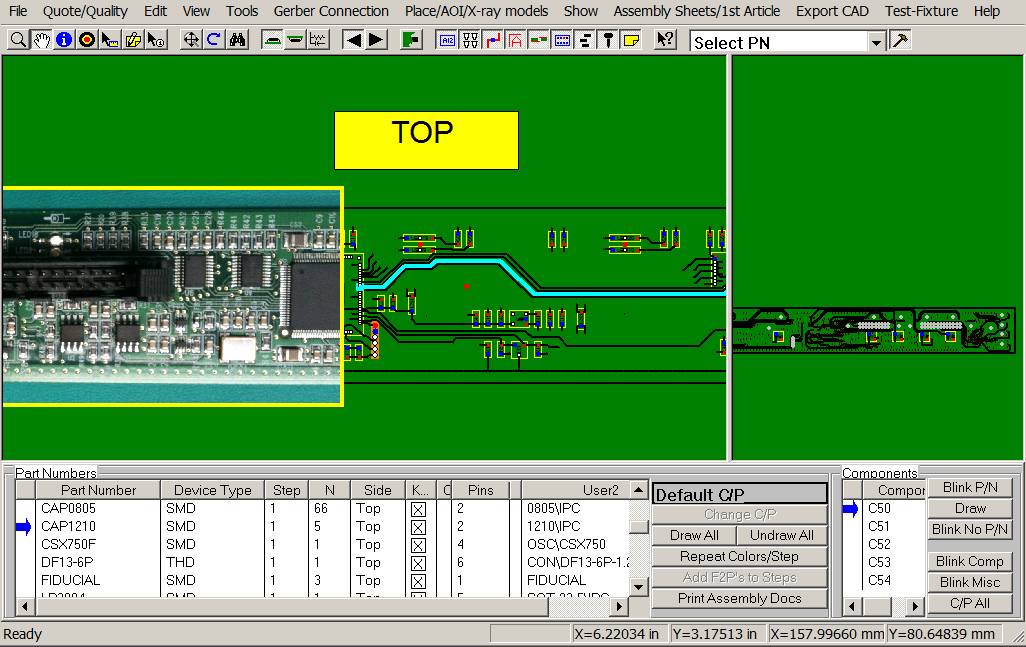
The Unisoft software allows you to BLINK all the components in
each part number. The
person doing the first article inspection would check that
each of those components are correctly
installed. If all where correct then they would click the
DRAW button to color those components to indicate they are correct.
A check mark is placed
next to the part number indicating it has been
completed. The inspector would continue this process for each part number until
all part numbers are colored at which point that would indicate the PC Board was
assembled correctly. At that point the PC Board can be built in quantity.

Free PC Board Viewer Software
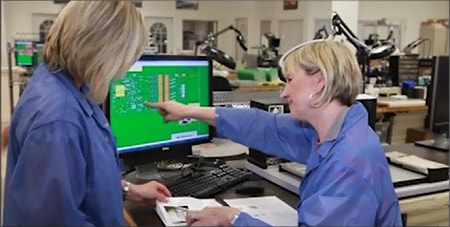
The Unisoft software outputs a single file that is compatible with the royalty free VIEWER software. Customers are licensed to distribute the VIEWER software and your single board file to your production floor, vendors, customers, etc. to aid assembly, 1st article inspection, general inspection, repair/rework, technician debug, for better communications, etc. No need to purchase additional licenses. The free VIEWER assists assembly personnel, technician troubleshooting, repair personnel, enhances communications internally and with customers and outside vendors. Our customers typically put the VIEWER and the board files for each of their PCB assemblies on their network so that it can be accessed by everyone to improve productivity.

![]()
|
Customer comments:
"Our Unisoft
configuration has been instrumental in reducing engineering development costs.
Maintaining an aggressive product development schedule would be impossible
without the Unisoft
tools." "I was first introduced to the
ProntoVIEW-MARKUP software several years ago by the Hewlett-Packard group in Puerto Rico. We use it every day here for practically every operation on the production floor."
We have used the Unisoft software
since 1993 and it works great!...
Just a
note to say I am using the free Unisoft PC Board VIEWER software extensively for a task
I am
working on. I think the difficulty of an alternate method would
greatly increase the time to completion.
In addition to our licensed copies of the Unisoft software we have over 50 users
of the Unisoft free VIEWER software at this Vermont plant. Unisoft has
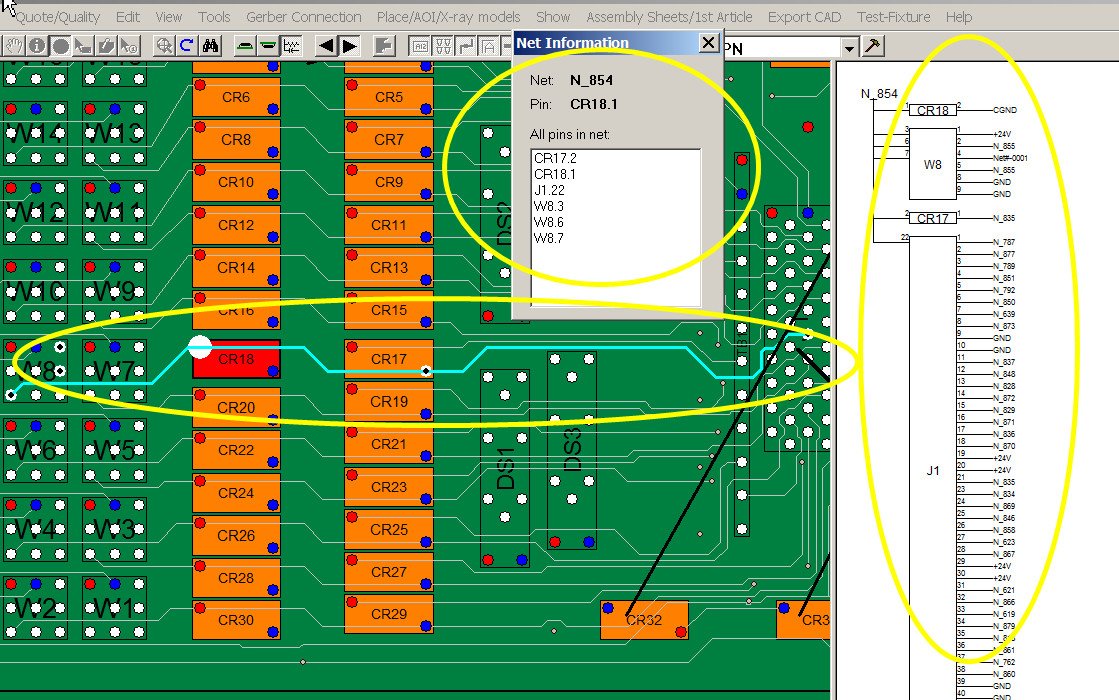
come to bat quickly anytime we have needed support. The online schematic feature in ProntoVIEW-MARKUP is super. We no longer need to have the schematic sheets on our desks. This is truly a great feature. |
![]()
Quotation and cost estimation reports
Import your PC Board into
the Unisoft software and you instantly receive a report containing component
counts for top and bottom of the PC Board broken down by SMT, Fine pitch, BGA’s,
Thru-hole, etc. This is a great time saver for Contract and OEM manufacturer.
EXAMPLE:
Report type: Device/package type count with quotation and cost estimation
generation.
PC Board: G23452 Rev X1
Date: 5-22-08
Estimated base build price total per board = $245.34
SMT 2 pins 0402 package type and smaller: .040 inch and smaller distance between
pin 1 & 2.
Top -
25 = total device count, 50 = total pin count
Bottom -
10 = total device count, 20 = total pin count
Part #'s -
6 = total part numbers
Base price: $53.50
= ( 0.10 * device count ) + ( 100/12 * part #'s )
SMT 2 pins Greater than 0402 package type: Greater than .040 inch distance
between pin 1 & 2.
Top -
112 = total device count, 224 = total pin count
Bottom -
40 = total device count, 80 = total pin count
Part #'s -
3 = total part numbers
Base price: $37.16
= ( 0.08 * device count ) + ( 100/12 * part #'s )
SMT 8 pins and greater and 30 mils or less pin spacing (fine pitch):
Top -
8 = total device count, 480 = total pin count
Bottom -
0 = total device count, 0 = total pin count
BGA's -
2 included in above count.
Part #'s -
4 = total part numbers
Base price: $34.85
= ( 0.12 * device count ) + ( 100/12 * part #'s ) + ( 0.14 *
BGA )
SMT 8 pins and greater and Greater than 30 mils pin spacing:
Top -
22 = total device count, 820 = total pin count
Bottom -
0 = total device count, 0 = total pin count
BGA's -
8 included in above count.
Part #'s -
7 = total part numbers
Base price: $61.49
= ( 0.10 * device count ) + ( 100/12 * part #'s ) + ( 0.12 *
BGA )
Thru-hole 2 pins:
Top -
36 = total device count, 72 = total pin count
Bottom -
0 = total device count, 0 = total pin count
Part #'s -
8 = total part numbers
Base price:
$9.00 = ( 0.25 * device count ) + ( 0.00 * part #'s )
![]()
Unisoft - Manufacturing software since 1986
|
list |
special |
comments |
|
|
RENTAL: ProntoVIEW-MARKUP 3 month rental. |
|
$1125* |
Complete system rental. Includes all CAD importers. Order now and this special rental price will be frozen for as long as the software is re-rented without interruption. Rental credit can be applied toward purchase. |
|
|
|
|
|
|
PURCHASE: ProntoVIEW-MARKUP purchase. |
|
$4500* |
Complete system purchase. Includes all CAD importers. |
|
|
|
*Price may not be available in all areas. |
- TUTORIAL MOVIE:
If you have not already done so we
suggest that you watch the tutorial movie which displays most features of the
software and will save you time in your product evaluation. Click this link
Literature Request
to download the ProntoVIEW-MARKUP tutorial movie .
- SLIDE SHOW: To download the Microsoft PowerPoint ProntoVIEW-MARKUP equivalent to the movie tutorial click here >> ProntoVIEW-MARKUP


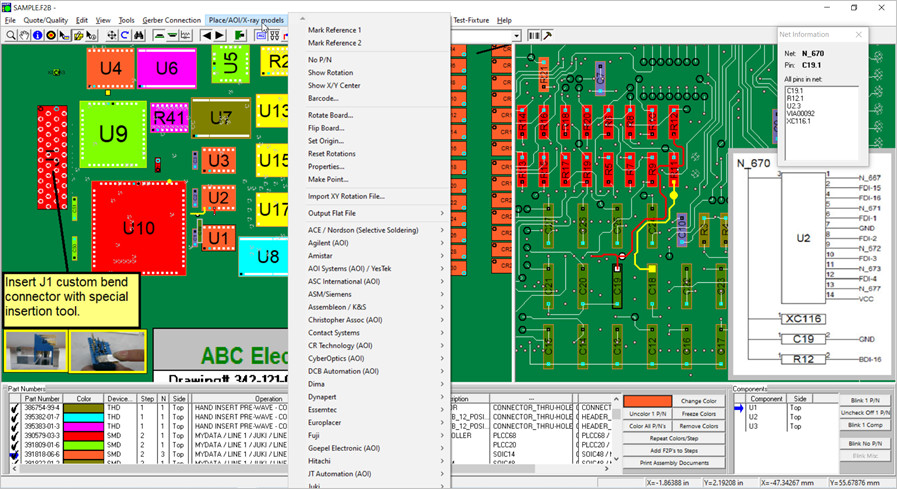
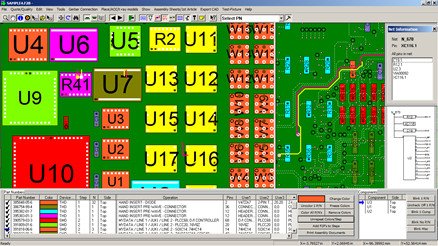
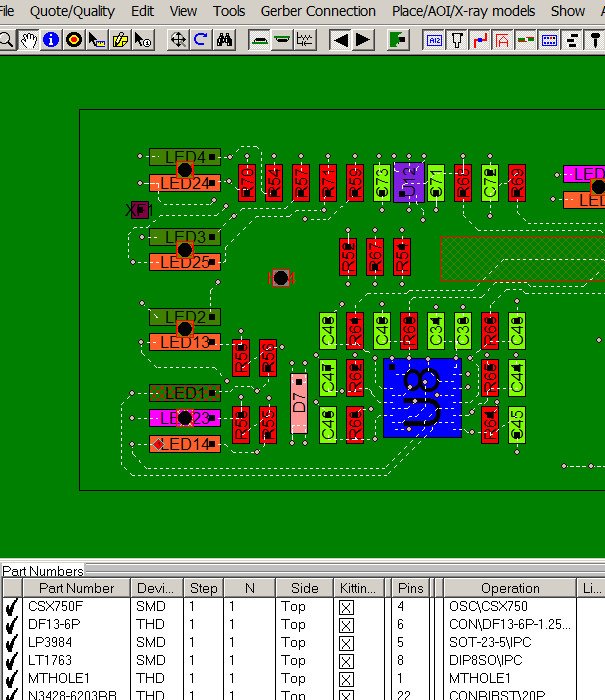
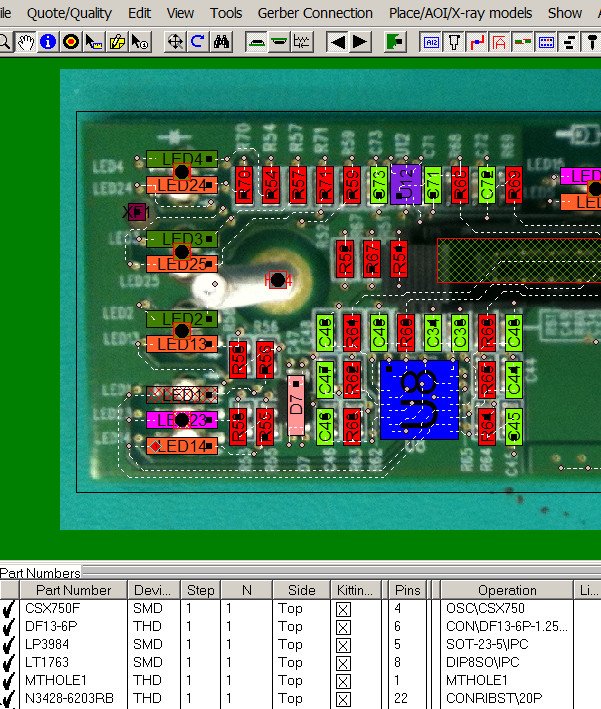
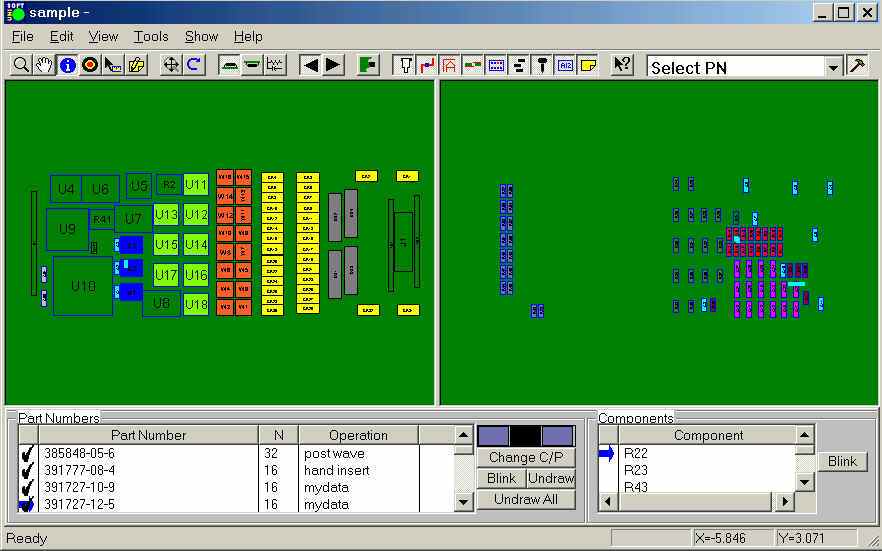
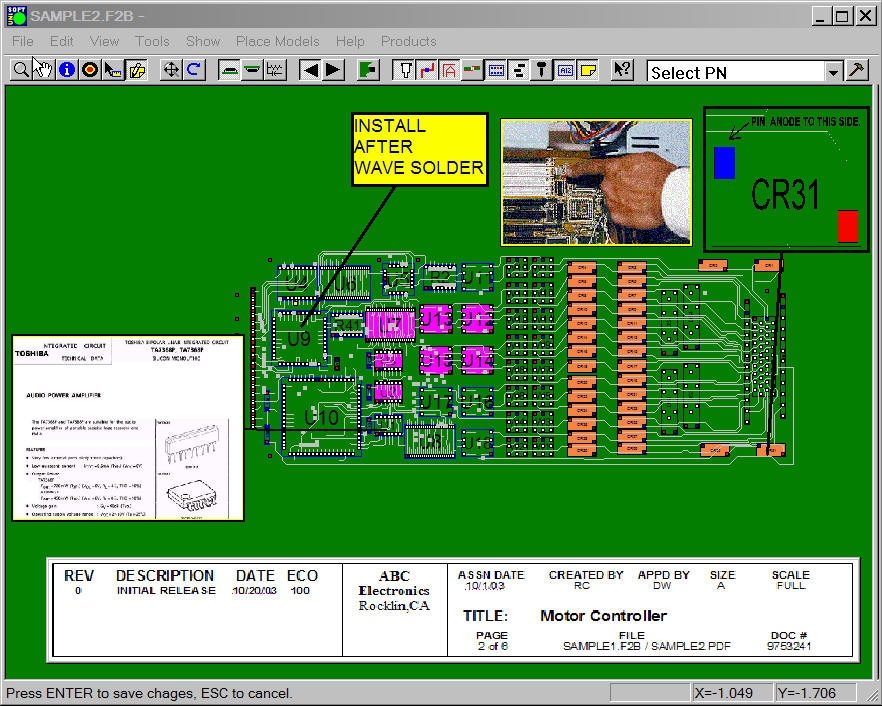
Smart Color(tm) - One feature of ProntoVIEW-MARKUP is Smart Color(tm). After importing the CAD file (above) Smart Color (below) has instantly sorted components by unique part numbers and assigned a distinctive color and pattern to each. Optionally detailed text instructions can be added to part numbers (for example "HAND INSERT AFTER WAVE" or "REFERENCE INSPECTION PROCEDURE QA-23"). PC display or printout the colors/patterns and text assign to each part number as assembly instructions, inspection aids (1st article inspection), etc. Click here to play the SMART COLOR movie . Call (203) 913-0782 for details.
ProntoVIEW-MARKUP - provides extremely fast PC Board first article inspection and general inspection. Increases productivity by automatically blinking and checking off for each part number until the PC Board is fully inspected.

ProntoVIEW-MARKUP is specialized
software for electronic manufacturers that creates an active display of virtually
any printed circuit assembly. ProntoVIEW-MARKUP aids
Manufacturing Production, Test & Design Engineering departments. Create assembly documents,
work instructions and process aids (Smart Color automatic assignment of unique colors and patterns to each part number on the
assembly), add text and graphic annotations.

ProntoVIEW-MARKUP FREEWARE:
The pay version of ProntoVIEW-MARKUP outputs a single file that is
compatible with the royalty free ProntoVIEW-MARKUP Freeware software.
This free ProntoVIEW-MARKUP is used by electronic manufacturers
and is designed for use across the entire production floor. ProntoVIEW-MARKUP
can also be sent to your customers and vendors for better communications. For
example ProntoVIEW-MARKUP can display process and assembly aid documents for
assembly personnel or it can find shorts on the PC Boards between two traces to
aid technicians in the troubleshooting department. ProntoVIEW-MARKUP will make
everyday production tasks easier and save your company money. ProntoVIEW-MARKUP
has over 100 features that aid the assembly department, first article inspection
area, general inspection, test departments, repair & rework areas , PCB
troubleshooting technicians, design group, etc. ProntoVIEW-MARKUP increases
efficiency, communication and reduces errors.
Here is a list of a few of the display features
of the free ProntoVIEW-MARKUP software:
- Instantly search by components, pins, nets, netnames, part
numbers. Find shorts between traces (highlight single or multiple traces).
- Find and Blink all components of a particular part number.
- Zoom, single/split screen, flip, rotate, change screen
settings, change printer settings, change start up display settings.
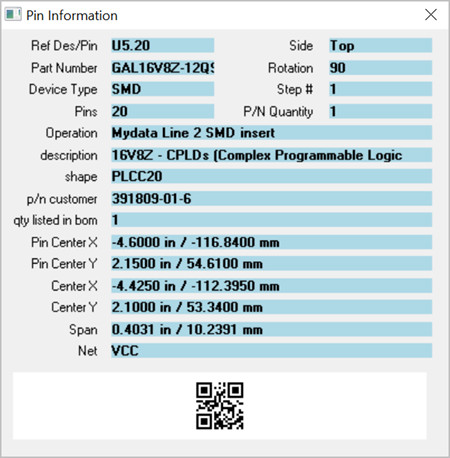
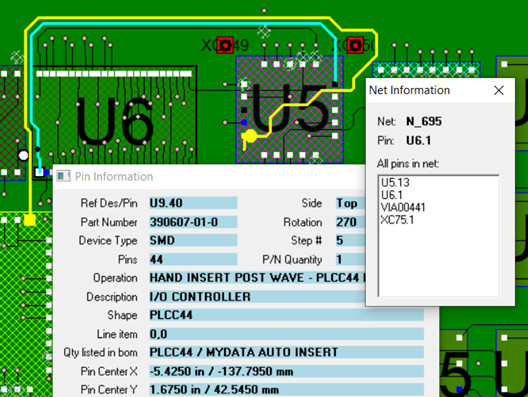
- Click on component to display name, pins, technology type,
surface, part number and all BOM part description information.
- Active schematic view that is hyper-linked to the assembly.
- Measurement tool and set new 0,0 origins
- Print or plot to any Windows compatible printer. Print the
full assembly or a zoomed in segment or a schematic segment.
- Display your process documentation, assembly sheets,
process aids (view unique colors and patterns for each part number on the
assembly). View the assigned separate colors to components for each assembly
step. View added text and graphic annotations.
- First Article Inspection - Blink components for each part
number then inspect parts and check off as inspected until entire PC Board is
inspected.
- Display virtually any CAD, Gerber and BOM format.
- Display and load single or multiple annotation overlays.
- View imported ATE test probe numbers. These test probe
numbers appear at their exact x/y location and you can search by test probe
numbers.
- View individually Colorize single or multiple components.
- View changed component properties to any part number.
- Control ProntoVIEW-MARKUP remotely from your application or
equipment via external API programming interface.
- More
Click here to play the SMART COLOR movie
Circuit Master ProntoVIEW-MARKUP receives its input by
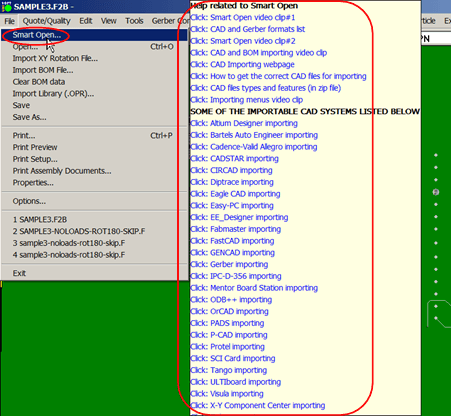
importing virtually any CAD and Bill Of Materials (BOM). Import files from
Gerber, Mentor Graphics, PADS, Intergraph,
OrCAD, Protel, Accel PCAD, Accel Tango, AutoCAD, Allegro, Cadence,
Cadnetixs, Cadstar, Computervision, Edif, Verybest, Visula, etc.
ProntoVIEW-MARKUP also imports standards such as IPCD356,
GENCAD, HPGL, Fabmaster, etc.
ProntoVIEW-MARKUP includes one FREE CAD importer, additional importers available.
ProntoVIEW-MARKUP has over 100 features. Manufacturing Process Engineers find the following feature exactly what they have been looking for by providing extremely fast PC Board first article inspection, general inspection, creation of assembly and process sheet instructions, etc.
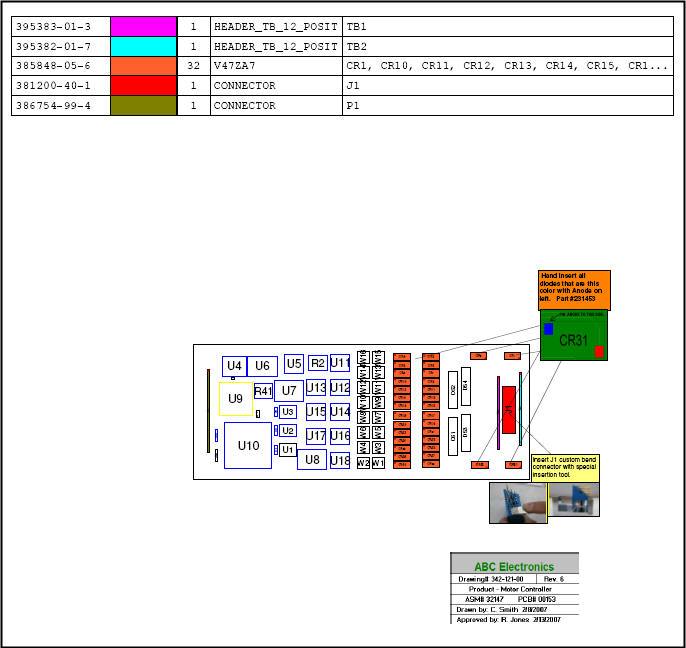
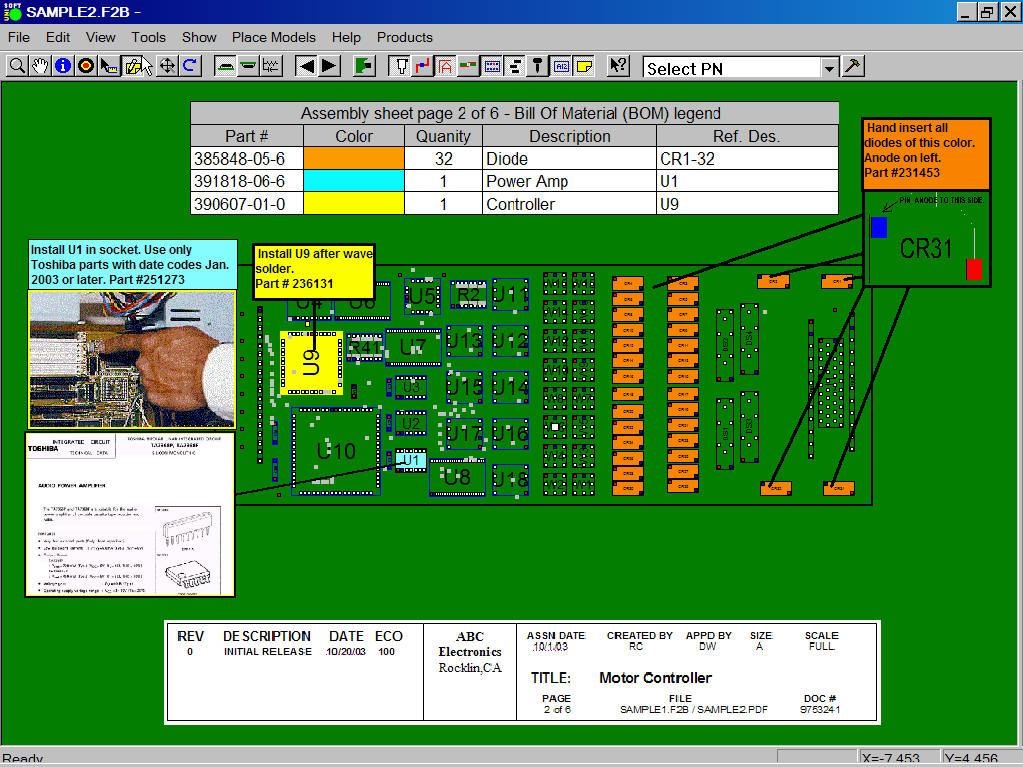
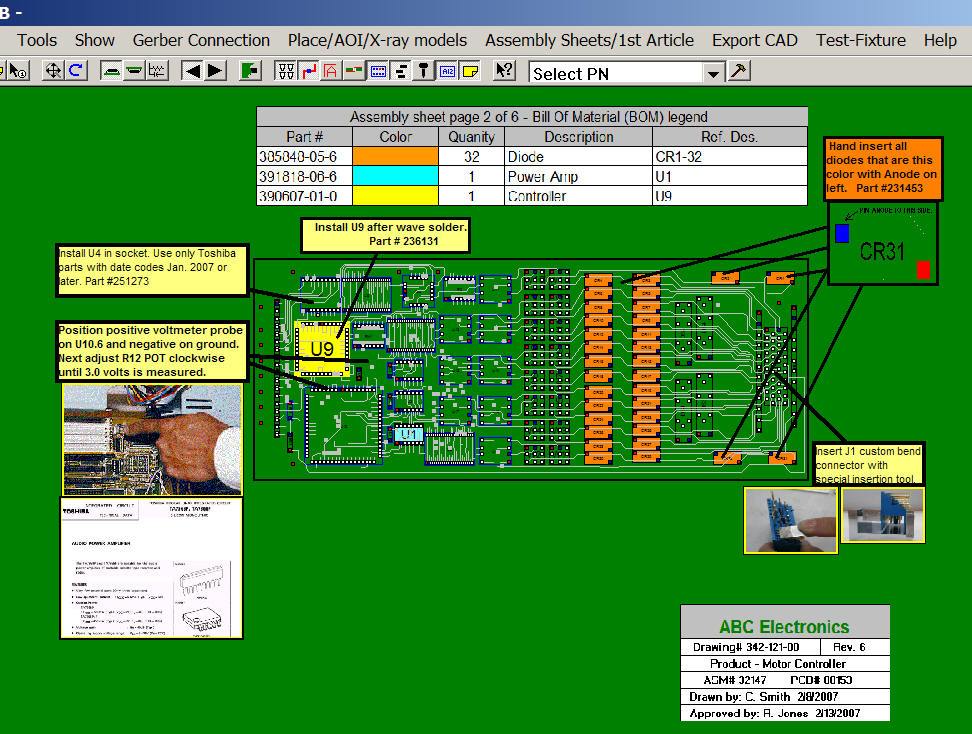
Assembly and Process sheet sample below.
Part numbers are automatically assigned to the assembly step you wish. The
part numbers are then automatically uniquely colored. Each step can then
be printed or displayed along with a matching colorized assembly drawing.

![]()


ProntoVIEW-MARKUP FEATURES:
- Import and display virtually any CAD or Gerber file.
- Import Bill of Material (BOM)
information and associate with each component. BOM importing is programmable to
accommodate multiple BOM styles formats.
- Instantly search by components,
pins, nets, netnames, part numbers. Find shorts between traces (highlight single
or multiple traces).
- Create your process
documentation, assembly sheets, process aids (automatic assignment of unique
colors and patterns to each part number on the assembly). Assign separate
colors to components for each assembly step, add text and graphic annotations.
- Find and Blink all components of
a particular part number.
- Zoom, single/split screen, flip,
rotate, change screen settings, change printer settings, change start up display
settings.
- Click on component to display
name, pins, technology type, surface, part number and all BOM part description
information.
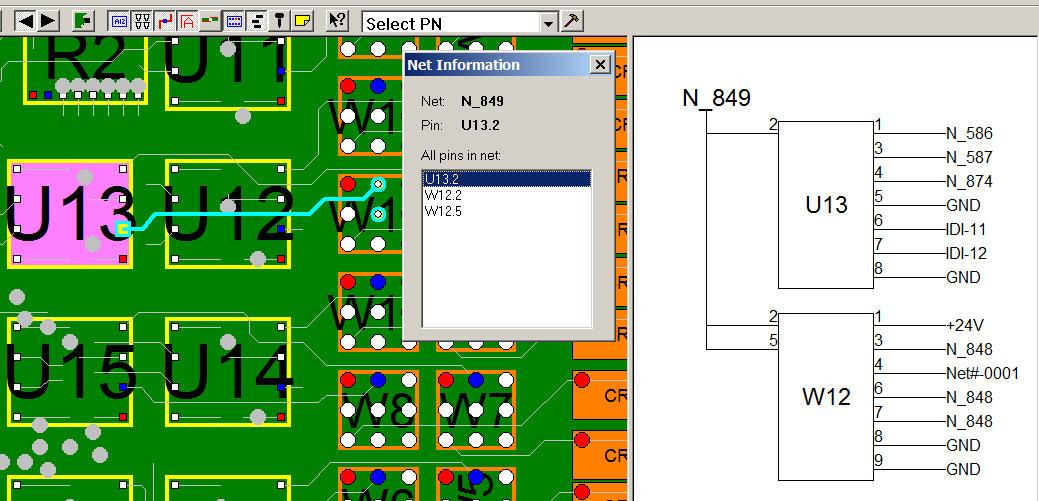
- Active schematic view that is
hyper-linked to the assembly.
- Measurement tool and set new 0,0
origins
- Print or plot to any Windows
compatible printer. Print the full assembly or a zoomed in segment or a
schematic segment.
- Display your process
documentation, assembly sheets, process aids (view unique colors and patterns
for each part number on the assembly). View the assigned separate colors to
components for each assembly step. View added text and graphic annotations.
- First Article Inspection - Blink
components for each part number then inspect parts and check off as inspected
until entire PC Board is inspected.
- Display virtually any CAD, Gerber
and BOM format.
- Save and load single or multiple
annotation overlays.
- Import and View imported ATE test
probe numbers. These test probe numbers appear at their exact x/y location and
you can search by test probe numbers.
- Add up to 4 User Text fields
automatically to any component.
- Change the component properties
of any part number.
- Any CAD file exported to a flat
ASCII file. Contains each component, pin, via, net-number, x/y, surface, etc.
(Useful for other systems - test, assembly equipment, etc.).
- Renumber nets, kill nets and auto
assign net numbers to "no connect" nets.
- Split Alphanumeric pins on
Import/Export, shorten long netnames on Import/Export.
- Change and view individually
colorize single or multiple components.
- Control ProntoVIEW-MARKUP
remotely from your application or equipment via external API programming
interface.
- More

|
|
Features include a PC Board assembly "redline" markup tool. Use ProntoVIEW-MARKUP to create process documentation, assembly instructions, etc. ProntoVIEW-MARKUP creates overlays, adds notes to the assembly, creates multiple color patterns on components, etc. A simple yet comprehensive tool for producing great documentation.


Circuit Master ProntoVIEW-MARKUP allows you to generate sophisticated printed or online documentation from your design data file by adding text annotations, importing graphics, and selecting colors for each component or group of components. Features such as find components, highlight multiple nets to find shorts, zoom, pan, and turn graphical elements on and off.
Full featured CAD / Gerber viewer. | |
Add Colors to Components. | |
Add Text Annotations. | |
Add Bitmap Annotations. | |
Print or Plot Annotated Pages. |
Full Featured CAD / Gerber viewer.
ASCII output from nearly any CAD system, plus Gerber, HPGL, and DXF formats, can be opened and displayed in seconds.
|
|
Print or Plot Annotated Pages
|
|
- TUTORIAL MOVIE:
If you have not already done so we
suggest that you watch the tutorial movie which displays most features of the
software and will save you time in your product evaluation. Click this link
Literature Request
to download the ProntoVIEW-MARKUP tutorial movie .
- SLIDE SHOW: To download the Microsoft PowerPoint ProntoVIEW-MARKUP equivalent to the movie tutorial click here >> ProntoVIEW-MARKUP
- DEMONSTRATION: Click here if you wish to schedule a private demonstration click here.
COMMENTS:
"Thanks you for your time and
working with me. The software is very valuable. Its been great."
Mike Knox - Hewlett-Packard, California
"Our UniSOFT configuration has
been instrumental in reducing engineering development costs. Maintaining an
aggressive product development schedule would be impossible without the UniSOFT
tools."
Mike Bartnick - Delco Electronics
"I was first introduced to the
ProntoVIEW-MARKUP software several years ago by the Hewlett-Packard group in Puerto Rico. We use it every day here for practically every operation on the production floor."
R.S. - Hewlett-Packard, California
The online schematic feature in ProntoVIEW-MARKUP is super. We no longer need to have the schematic sheets on our desks. This is truly a great feature.
Jay Aglei - SSI Inc.
We appreciate everything your
company has done for us, you have definitely made us more competitive.
Jay Patel
It's really hard to believe the amount of features packed into this software for the price. Throughout our evaluation process we were really trying to figure out what was missing but we couldn't find anything. As I mentioned earlier we will be placing the purchase order early next week for the full
ProntoVIEW-MARKUP package with all the CAD importers.
R.A.
Just for your information, I've
sent your coordinates and a sample file to one fellow worker in MCMS Penang
(Malaysia) in order for him to evaluate especially that amazing feature of
ProntoVIEW-MARKUP that consists in re-creating the schematics from the nodes.
Yves de
Ryckel - Managing Director MCMS, Belgium
Thousand of thanks!
ProntoVIEW-MARKUP working like crazy. I can not
believe I now have this powerful tool . You are great.
Cristian
Lungu - Solectron
The software is now in use on our shop floor, and is proving to be very useful indeed.
Just thought I'd let you know that
the feedback I am getting from the test and repair technicians on our
production floor is extremely positive, now that they are using the VIEWER
software every day....and wonder how they survived without it ! They find all
the features really good and your software has dramatically reduced the time
taken to locate components and fix faults etc. The investment has paid for
itself already. We have not yet really used the annotation features of the
software but I'm hoping to get this off the ground in the near future.
Keep up the good work.
Gerry I. - Benchmark
Electronics Europe
Update from Gerry:
I thought you might like to know that I just recently started using the annotation and embedded graphic features of the
ProntoVIEW-MARKUP software, and we are very impressed with it.
I look forward to hearing from you.
Regards and thanks,
Gerry I. - Benchmark
Electronics Europe
I have presented the software to a number of my techs. They really like it.
One of the primary reasons I wanted to try your software was the versatility
of using either Pads or Mentor files. The ease of use has been so great
that even our engineers have expressed an interest.
DB - General Electric
Thanks for the ProntoVIEW-MARKUP software program. It is really good...
Leonid -
Israel
Finally, I found some time to use
your software. It's a very good product. ...ProntoVIEW-MARKUP is the best
product we have found in our evaluation.
RD -
Celestica
We are beginning to see the
benefits of using the software and it has been a great aid to our inspection
people.
Willie Anderson
- Keytech Systems,
Scotland
...ProntoVIEW-MARKUP is a splendid product.
K.O. -
Takaya Corp. (Japan)
"Several years ago we purchased
ProntoTEST-FIXTURE software for our Genrad ATE. Later we ordered
ProntoTEST-FIXTURE for our
Hewlett Packard test equipment with good results. Now we have ProntoPLACE for our two MYDATA SMT component placement machines and use
ProntoVIEW-MARKUP for providing paper or paperless process documentation for our assembly and
repair operations. We are extremely happy with the way the
Unisoft FACTORY suite has
worked for us."
Tony Marino - Plant Manager, Bristol
Babcock
We are extremely happy with
ProntoVIEW-MARKUP paperless process documentation and repair software. We have also
purchased ProntoPLACE for our Universal assembly equipment.
A. Manual. - Keithly Instruments
I've been having a good look at
this software and I'm impressed with all the
different types of data it can import, not only with PADS and Mentor
Graphics, but also HPGL and DXF files that we also use. Also it can be
quite handy for the other formats such as Orcad and Allegro as we sometimes
get these files sent to us from other customers. It read in our board designs
without problems.
I am using your shareware
version of ProntoVIEW-MARKUP and I wonder how I buy your
excellent program?
What is the price?
Ulf
K. - Ericsson Microwave Systems AB,
Sweden
Very powerful aid tool.
S.V. - Kortex Europe
Several people in our company have looked at
the ProntoVIEW-MARKUP software, and we are definitely interested in buying it, it looks like it will do just what we need!
JS - European Electronics
We have used the Unisoft software
since 1993
and it works great!...
Just a
note to say I am using the free Unisoft PC Board VIEWER software extensively for a task
I am
working on. I think the difficulty of an alternate method would
greatly increase the time to completion.
In addition to our licensed copies of the Unisoft software we have over 50 users
of the Unisoft free VIEWER software at this Vermont plant. Unisoft has
come to bat quickly anytime we have needed support.
John Harrington - BF Goodrich Aerospace
Being able to highlight a single or multiple traces and then to follow a signal or to find the potential location of shorted traces is a tremendous feature of the
ProntoVIEW-MARKUP software, we use it every day.
Frank Benton - Europe
NOTE TO OEM EQUIPMENT MANUFACTURERS:
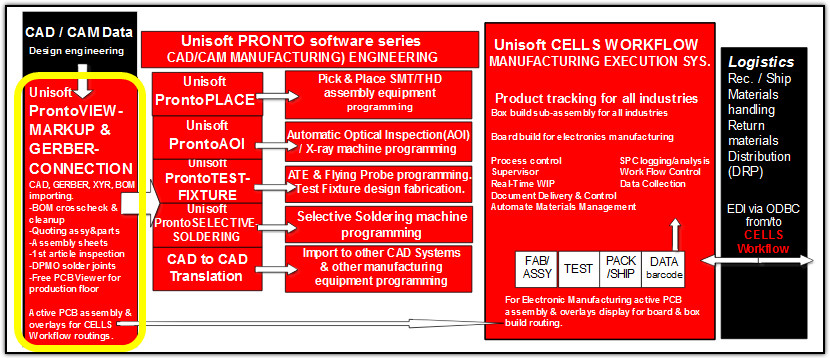
If you are a manufacture of TEST, INSPECTION, ASSEMBLY & CAD equipment UniSOFT can supply you with software to support your systems. Contact us for details oem1@UniSOFT-cim.com.
For example: Distribute Circuit Master ProntoVIEW-MARKUP with your equipment. Use a visual basic script to control functions from your system. Add features such as outputs for TEST or Assembly setup, data collection, document delivery, tracking, routing, repair loop, etc.
INVESTIGATE OUR OTHER SHOP FLOOR AUTOMATION SOFTWARE:
-
CELLS Product & Job Tracking MES
is a Process Control System for use in manufacturing sectors such as electronics, semiconductor, automotive, aerospace, medical devices, pharmaceuticals and food processing.
CELLS Product & Job Tracking MES includes complete product tracking, inventory tracking software, defect tracking software, collection data, deliver & control documents, Statistical Process Control (SPC) quality reporting and more.
- Circuit Master TEST and FIXTURE will accurately setup your Automatic Test Equipment (ATE) and design your "bed of nails" test fixturing.
- Circuit Master ProntoPLACE will quickly program your surface mount SMT and thru-hole assembly equipment.
- Circuit Master ProntoGERBER CONNECTION imports raw Gerber data and allows the user to add intelligent information to the shapes on the display. This smart data is then used directly by the other UniSOFT FACTORY software modules or export to standard ASCII file formats for use by other manufacturing systems.
Assembly test check sheet, create assembly instructions, create assembly sheets, create process sheets, documentation process, electronic repair software, iso 9000 work instructions, paperless repair, pc board assembly, pc board repair , pcb production, pcb production aids, process sheet, software process documentation, teradyne repair.
|
Send mail to web_master_@UniSOFT-cim.com
with questions or comments about this web site.
|